
Download EMERGE App – Advanced Inventory Management & Accounting Tool
Overview & Core Features
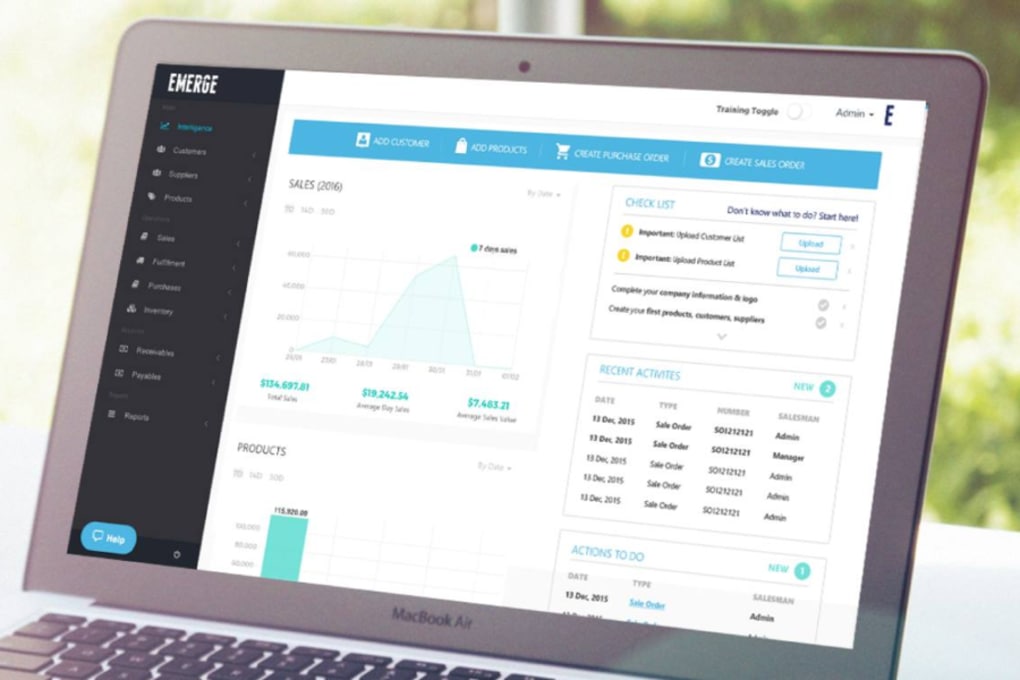
EMERGE App is a sophisticated inventory management and accounting solution designed specifically for eCommerce retailers, distributors, and trading companies. By marrying real‑time stock tracking with automatic bookkeeping entries, EMERGE eliminates the manual double‑entry nightmare that plagues most merchant businesses. The platform’s clean, colour‑coded interface makes it easy to spot low‑stock warnings, fast‑moving items, and potential shortages before they become critical. What truly sets EMERGE apart is its ability to translate every inventory movement—receipts, adjustments, sales, returns—into a ready‑to‑post journal entry, dramatically reducing the time spent on daily accounting chores.
Key Benefits
- Real‑time inventory visibility across multiple warehouses.
- Automatic conversion of stock turnover into bookkeeping entries.
- Customisable alerts for re‑order points, expiry dates, and slow‑moving stock.
- Intuitive colour‑coded dashboard that highlights stock health at a glance.
- Seamless integration with popular eCommerce platforms (Shopify, WooCommerce, Magento).
- Built‑in reporting engine for profit‑margin analysis, inventory ageing, and audit trails.
- Multi‑user roles and permission settings for secure collaboration.
Beyond the basics, EMERGE offers advanced analytics that let you model future stock requirements based on historical turnover trends. This predictive capability helps merchants avoid costly over‑stock situations while ensuring they never run out of high‑demand items. The app also supports batch and serial number tracking, making it suitable for businesses that need strict traceability—such as food distributors or electronics wholesalers. Overall, EMERGE delivers a balanced blend of operational control and financial accuracy, positioning it as a must‑have tool for any growth‑focused merchant.
Installation, Setup & Compatibility
Getting EMERGE App up and running is a straightforward process that can be completed in under thirty minutes, even for users with limited technical expertise. The software is available as a cloud‑hosted SaaS solution, which means there is no need to download bulky installers or manage local servers. Simply visit the official website, create a secure account, and you’ll be prompted to choose your subscription tier. After confirming your payment details, you’ll receive an activation email containing a unique login URL.
Step‑by‑Step Installation Guide
- Visit www.emergeapp.com and click “Start Free Trial”.
- Enter your business email, create a strong password, and verify your account via the confirmation link.
- Choose your preferred subscription plan (Free, Pro, Enterprise) and complete the secure checkout.
- Log in to the dashboard and follow the on‑screen wizard to import existing product lists via CSV or API.
- Configure your warehouse locations, tax rules, and accounting chart of accounts.
- Enable integrations with your eCommerce store, accounting software (QuickBooks, Xero), and payment gateways.
- Run the “Test Transaction” module to ensure inventory movements are correctly reflected in bookkeeping entries.
EMERGE is built on a responsive web architecture, making it fully compatible with all major operating systems and browsers. The platform supports Windows 10/11, macOS 12+, Linux distributions, as well as mobile devices running Android 9+ and iOS 13+. Because the application runs in the cloud, users enjoy automatic updates, data backups, and high‑availability uptime without the need for manual patching.
Supported operating systems: Windows, macOS, Linux, Android, iOS (via web browser or native wrapper).
For businesses that prefer an on‑premise deployment, EMERGE also offers a self‑hosted Docker image. This option provides the same feature set while giving IT teams full control over data residency and security policies. Detailed documentation and 24/7 technical support are included with every subscription, ensuring that any hiccup during installation can be resolved quickly.
Pros & Cons
Advantages of Using EMERGE App
- Automation of bookkeeping: Reduces manual entry errors and saves hours each week.
- Real‑time visibility: Instantly see stock levels across all channels and warehouses.
- Scalable architecture: Grows with your business from a single‑store operation to a multi‑national distribution network.
- Predictive analytics: Helps forecast demand and optimise re‑order points.
- Cross‑platform access: Works on desktop, tablet, and smartphone without sacrificing functionality.
- Robust security: Role‑based permissions, SSL encryption, and regular security audits.
Potential Drawbacks
- Learning curve for advanced features: Users new to inventory‑accounting integration may need time to master custom reports.
- Dependence on internet connectivity: As a cloud‑first solution, offline usage is limited to the mobile wrapper’s cache.
- Pricing for enterprise tier: Larger organisations may find the subscription cost higher than traditional on‑premise ERP packages.
- Limited native mobile app: While the web interface is mobile‑friendly, a dedicated iOS/Android app is still in beta.
Frequently Asked Questions
-
Is there a free version of EMERGE App?
Yes, EMERGE offers a free tier that includes basic inventory tracking and limited bookkeeping automation. It’s ideal for small startups looking to test the platform before upgrading.
-
Can EMERGE integrate with my existing accounting software?
Absolutely. EMERGE provides native connectors for QuickBooks Online, Xero, and Sage, as well as a robust API for custom integrations.
-
How secure is my data stored in the cloud?
Data security is a top priority. EMERGE uses AES‑256 encryption, two‑factor authentication, and undergoes quarterly penetration testing to safeguard your information.
-
What support options are available for enterprise customers?
Enterprise clients receive a dedicated account manager, 24/7 live chat, priority ticket handling, and optional on‑site training sessions.
-
Can I customize the dashboard to match my brand colors?
Yes, the platform allows extensive theming. You can upload your logo, select custom colour palettes, and arrange widgets to reflect your brand identity.
Conclusion & Call to Action
EMERGE App stands out as a comprehensive, cloud‑native solution that bridges the gap between inventory oversight and financial accuracy. Its real‑time stock dashboards, automated journal entries, and predictive analytics empower merchants to make data‑driven decisions while cutting down on tedious bookkeeping tasks. Although the platform’s advanced features may require a brief onboarding period, the payoff in efficiency and error reduction is well worth the investment. Whether you operate a single‑store Shopify shop or manage a multi‑warehouse distribution network, EMERGE scales to meet your needs.
If you’re ready to streamline your inventory processes and let the software handle the accounting heavy‑lifting, download EMERGE App today and start your free trial. Experience the blend of simplicity, power, and security that modern merchants deserve.



.png)



